
DESIGN SYSTEMS
Keep design decisions consistent across every shipped surface.
Turn Design System Package JSON into typed Rust at build time, then let widgets, charts, and shells consume the same colors, spacing, typography, variants, and interaction states.
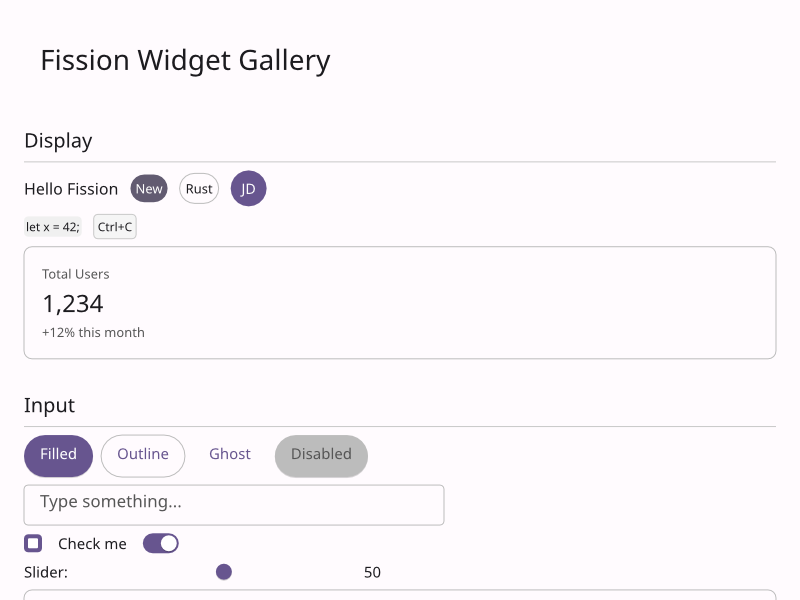
Built-in widgets styled by one set of design tokens
DESIGN INTEGRATION
Tokens and component states become typed UI input.
Fission treats a design system as code-generated product infrastructure, not a blob of JSON that widgets parse while rendering.
DSP JSON
Bring your system
Read design system package JSON at build time and generate typed Rust theme structures.
COMPONENTS
Variants and states
Apply sizes, variants, hover, active, focus, disabled, error, shadows, borders, typography, icon sizing, and dark/light behavior.
CHARTS
Visualization palette
Use generated data-visualization palettes so charts match the product design system.
THEME SYSTEM
Design data flows from package JSON to Env.
The runtime should consume typed tokens for color, spacing, typography, components, charts, dark mode, and state-specific styling.
BUILD-TIME CODEGEN
JSON becomes typed Rust
Design System Package JSON is read during the build, generating Rust structures so widgets do not parse JSON on the rendering hot path.
Design guide
RUNTIME SELECTION
Env chooses the active theme
Applications can select light, dark, brand, density, or locale-aware themes in the environment callback while widgets consume stable tokens.
Theme and locale
COMPONENT STATES
Variants are product rules
Buttons, inputs, charts, surfaces, typography, shadows, borders, icon sizes, and interaction states should all come from the same design model.
Theme reference
THEME PATH
Generate code, choose a theme, apply it everywhere.
01
Generate
Convert design system JSON into typed theme code during the build.
02
Select
Set the active theme through Env from user or platform preference.
03
Apply
Let widgets, charts, shells, and product targets consume the same tokens.
No JSON hot path
Design system JSON is converted during the build, then app code selects typed themes through Env at runtime.