
File-system tree
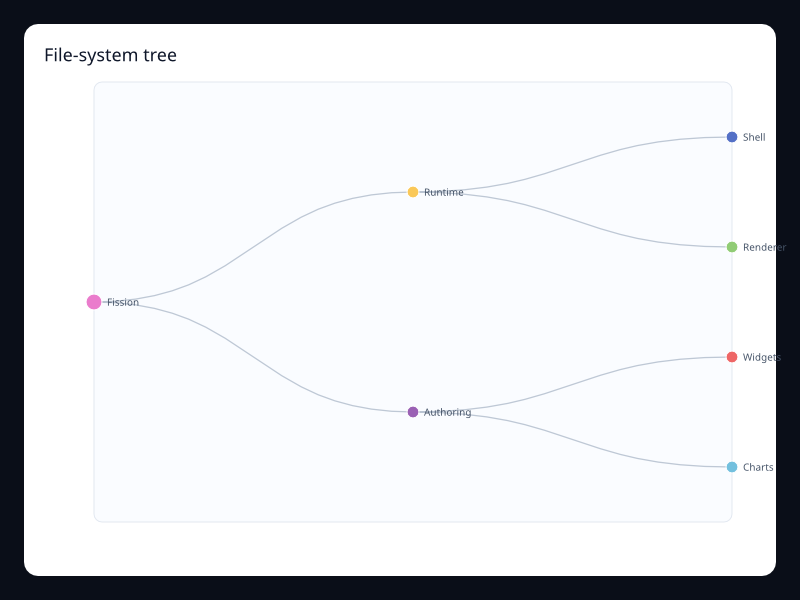
A file-system tree shows containment: a folder owns the files and subfolders below it. That structure is useful when explaining how a project is organised, without implying that neighbouring branches depend on one another. The screenshot is from Fission's chart gallery.
What the chart is for
Use a chart for a read-only structural overview. For an interactive file browser with disclosure, selection and keyboard navigation, use Fission's TreeView rather than rebuilding those behaviours around a chart.
Data model
TreeSeries uses nested TreemapNode values. Children represent containment, not symbolic-link targets. The example uses unit leaf values because this is a structural diagram; use a storage treemap if area should communicate disk usage.
Rust API
Setting | Type | Meaning |
|---|---|---|
TreeSeries::data | Vec<TreemapNode> | Supplies the root nodes and their nested children. |
TreemapNode::children | Vec<TreemapNode> | Describes the next level of the hierarchy. |
TreemapNode::value | f32 | Carries the node's numeric measure. |
Chart::series | Vec<Series> | Adds this hierarchy without Cartesian axes. |
Example
use fission::charts::{Chart, TreeSeries, TreemapNode};

let nodes = vec![TreemapNode {
    name: "Project".into(),
    value: 2.0,
    children: vec![
        TreemapNode {
            name: "Source".into(),
            value: 1.0,
            children: vec![],
        },
        TreemapNode {
            name: "Assets".into(),
            value: 1.0,
            children: vec![],
        },
    ],
}];

let chart = Chart::new()
    .title("Project folder hierarchy")
    .series(vec![TreeSeries::new("Folders")
        .data(nodes)
        .radial(false)
        .into()]);
Authoring from a Fission component
The parent supplies the prepared hierarchy. Keep loading, aggregation and any errors outside this presentation component.
use fission::prelude::*;
use fission::charts::{Chart, TreeSeries, TreemapNode};

// The parent resolves display labels from its translation bundles.
fission_component! {
    pub FileSystemTreeChart<()> {
        props {
            chart_title: String,
            series_label: String,
            nodes: Vec<TreemapNode>,
        }
    }
    view(hierarchy, _state, _cx) =>
        Chart(
            title: Some(hierarchy.chart_title.clone()),
            series: vec![TreeSeries::new(&hierarchy.series_label)
                .data(hierarchy.nodes.clone())
                .radial(false)
                .into()],
        )
}
Testing and accessibility
Check empty folders, deeply nested paths and repeated folder names under different parents. Resolve links and filesystem errors before constructing the view; do not traverse directories during component conversion.
Tags: tree, files.
Previous
Energy sankey
Next
Org tree